Behind the Button
A visitor check relies on a form value that is not visibly editable. Inspect what the browser actually submits and test whether invisibility creates trust.
Objective
- Inspect and modify a hidden form control.
- Explain why hidden inputs remain untrusted client data.
Before you begin
Open /challenge/easy/hidden with the Elements or page-source viewer available.
Concepts
An HTML hidden input affects presentation, not authority. Its name and value are delivered to the browser and can be changed before submission.
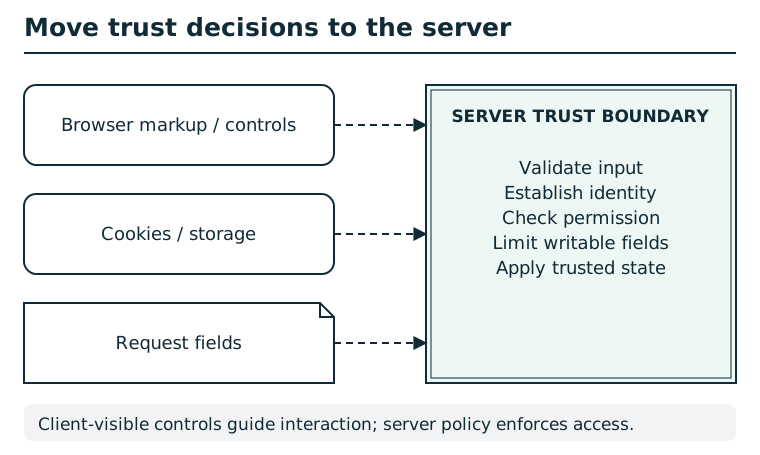
The browser can change local markup, storage, cookies, and request fields. Hiding a control or trusting a client-supplied role does not enforce permission. The server validates input, establishes identity, checks authorization, and limits writable fields before changing trusted state. A signed client value still needs correct verification, scope, and freshness checks.
Suggested tools
- Elements inspector: Edit the input value before pressing the normal button; an HTTP client can submit the same form field directly.
Tool practice
Rehearse the worked tool exercise before using challenge data.
Use the local hidden-input exercise first. On the challenge, submit the ordinary form while Network is open. In Payload/Request, identify the field name and value. Return to the form, edit its value in Elements/Inspector, submit again, and compare both request bodies.
Investigation
Observe
Find the hidden input and record its field name and ordinary value. Click Check clearance without changing the form, then note the higher clearance named by the rejected response. Return to the challenge page before editing the input.
Form a hypothesis
Will the API authorize a request solely from a modified hidden value?
Test carefully
Change only that value and submit the form once.
Progressive hints
Hint 1
Inspect the form HTML, not only visible controls.
Hint 2
Find the clearance input.
Hint 3
Submit the unchanged form first. The rejected response names the higher clearance. Return to the form, change the hidden value to that clearance, and submit again.
Troubleshooting and reset
If editing the live DOM is awkward, submit an equivalent form request through an HTTP client. The ordinary form value restores the initial response.