Maintenance Window
River Station 14 recorded a series of successful and failed access attempts around the telemetry incident. Compare the access history with the station's commissioning record to determine which accepted session falls outside policy and which unfinished control made that access possible.
Objective
By completing this module, you will be able to:
- distinguish a successful authentication event from authorized activity;
- compare log timestamps and actions with a documented maintenance policy; and
- correlate an account in one artifact with an incomplete credential-lifecycle control in another.
Before you begin
Open Maintenance Window and download both evidence files. Keep the original files unchanged and record observations in a separate note. The access log states its clock near the beginning or end of the file; the commissioning record states the allowed maintenance schedule and marks checklist items as complete or incomplete.
Review Evidence, Authentication, and Authorization in the glossary if those distinctions are unfamiliar.
Concepts
An ALLOW event establishes that the system accepted an authentication method for an account. It does not establish that the person or process was permitted to connect at that time or perform the recorded actions. Authorization may also depend on a maintenance window, an incident ticket, an approved source, or a separate acknowledgement.
Commissioning is part of a credential's lifecycle. Temporary access may be necessary during setup, but a handoff procedure should replace temporary credentials, record the change, and resolve incomplete items before acceptance. An unchecked control is stronger evidence than an assumption based only on an account name.
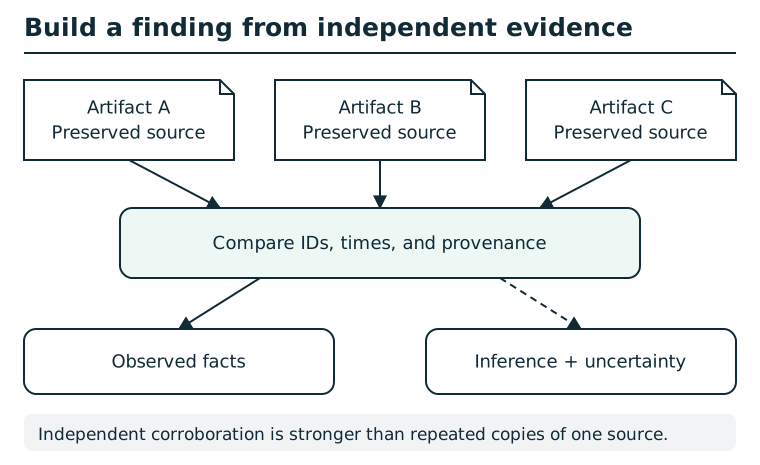
Preserve each artifact and record its source before comparing identifiers, timestamps, and provenance. A repeated value can link records, but shared origin or copied data may make evidence dependent. Separate observed facts from inferred relationships, note conflicting explanations, and state the limits of the resulting finding. Correlation alone does not prove causation.
Suggested tools
- Browser: Download the two text artifacts and submit the supported finding.
- Text editor: Open the files side by side and search for account names, successful outcomes, maintenance actions, and incomplete checklist markers. A printed copy and highlighter are an accessible alternative.
Tool practice
Rehearse the worked tool exercise before using challenge data.
Search the log for successful outcomes, then search the resulting account or session identifier literally to gather surrounding actions. Record timestamps and the clock declaration. In the commissioning file, distinguish [x] from [ ] before selecting a policy weakness.
Investigation
Observe
Build a small table from the access log with columns for timestamp, outcome, account, source, authentication method, and action. Record which entries are successful and which are only failed attempts. Separately note:
- the day and time allowed by the maintenance policy;
- any additional condition for emergency access;
- the account types created during commissioning; and
- each incomplete access-handoff item.
Form a hypothesis
Which successful session is inconsistent with the documented schedule? Does the log show only a login, or does the same session perform maintenance actions? When you carry that account name into the commissioning record, which unfinished control provides a documented explanation for the weakness?
Avoid treating every unusual source address or failed password attempt as the incident. Your hypothesis should account for an accepted session, its timing, its activity, and a matching lifecycle control.
Test carefully
Filter your table to successful events, then compare human or maintenance activity with the authorized window. Follow the candidate session from login through its later actions and logout. Search for that exact account in the commissioning record and check the status of the related handoff tasks.
Submit the account exactly as the evidence spells it and select the access weakness supported by the incomplete checklist item. If the station rejects the finding, return to the two source records rather than guessing another account.
Progressive hints
Hint 1
Start with successful login events. Compare their day and time with the scheduled remote window, then follow any nearby maintenance actions using the account and session information.
Hint 2
Once one account stands out, search for its name in the commissioning record. The account's authentication method and handoff section matter more than routine sensor or monitor activity.
Troubleshooting and reset
If the log is hard to read, disable visual line wrapping or copy only the relevant columns into a table without editing the source file. Confirm the log's declared clock and compare the scheduled day as well as the hour. Do not count a DENY entry as a successful session.
If a supported finding is rejected, check the account's exact spelling and make sure the selected weakness comes from an incomplete access-handoff item rather than an unrelated sensor or certificate detail. Completing the finding reveals a seal; file it on the River Station incident board to record progress.